








New: design your card with AI

Design a loyalty card people keep

Describe your business and AI designs the card, the artwork and the rewards. Customers save it to Apple Wallet or Google Wallet in one tap.

Press Enter to start. It's free.

Or start from
  • Apple Wallet
  • Google Wallet
  • Nothing to install
  • Free up to 200 customers
How it works

From signup to first scan

No developers, no integrations, and nothing for your customers to install.

  1. 01

    Design your card

    Describe your business to the AI designer, or fill in the form yourself. Choose a points card or a stamp card, then decide what earns a point or a stamp and what a finished card is worth, so the program matches the way your business already runs rather than the other way around.

  2. 02

    Share one QR code

    Print it for the counter, add it to receipts, or put it in the window. Customers scan it with the camera they already use, and the card saves straight to Apple Wallet or Google Wallet. No download, no signup, no friction at the till.

  3. 03

    Reward the visits that follow

    Balances update on the pass in real time, so nobody has to ask how close they are. Milestones release a reward the moment a customer reaches the number you set, and Plus and Pro can push a message to the pass when it is worth bringing someone back.

Why it works

Everything a loyalty program needs. Nothing it doesn't.

Digital Wallet

Straight into the wallet they already use

Your customers can add their loyalty card to Apple Wallet or Google Wallet with a single tap. No app download required: just scan, save, and go. Cards update in real time so balances and rewards are always current.
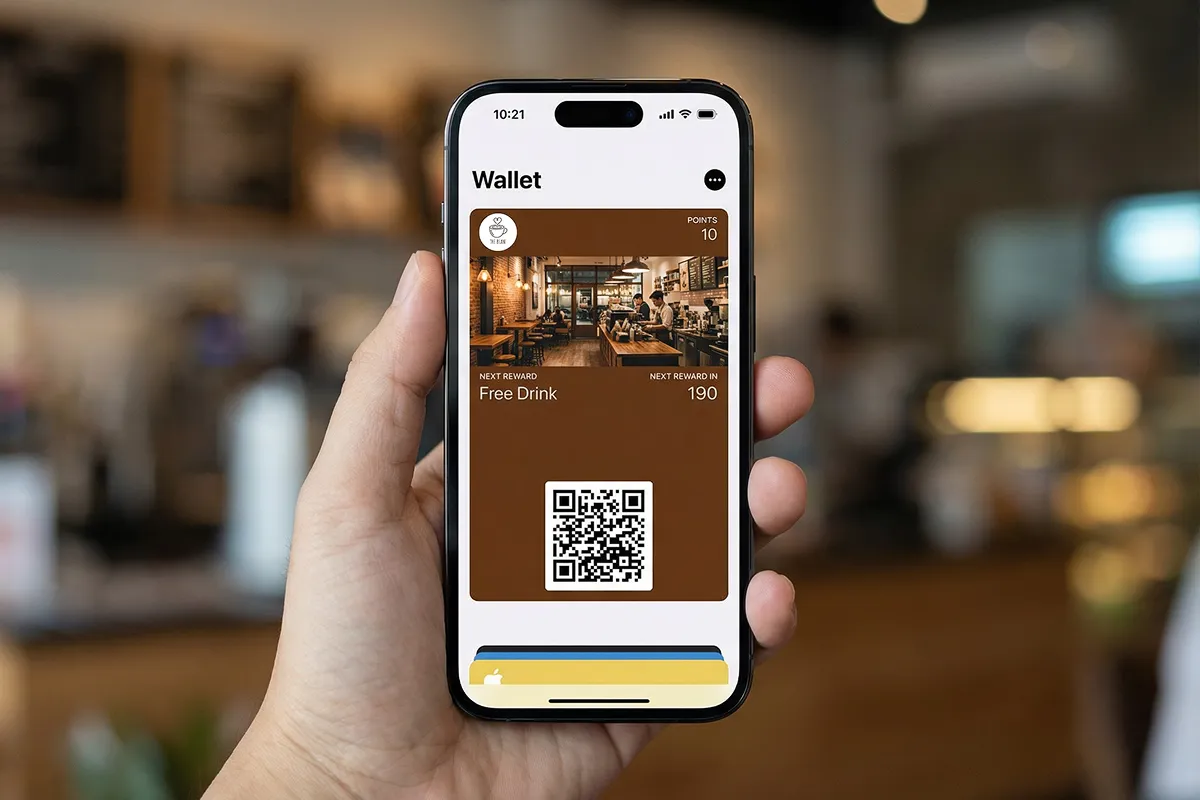
A hand holding a phone showing a coffee shop loyalty card in Apple Wallet
Full Customization

Your brand, your way

Design cards that match your brand perfectly. Choose custom colors, upload your logo, add strip images, and configure reward tiers, all from an intuitive dashboard. Every touchpoint reflects your identity.

Try a color
Quick Setup

Minutes, not days

Go live in under five minutes. Answer a few questions, upload your logo, and your loyalty program is ready to share. No developers, no integrations, no waiting. Just sign up and start rewarding customers today.

  1. 0 minSign up
  2. 2 minCard designed
  3. 4 minFirst scan
Points or stamps

Points for spend, stamps for visits

A points card rewards every dollar a customer spends. A stamp card gives a stamp for every visit and a reward when the card is full, like the paper punch card your customers already know, except this one never gets lost. Choose either on any plan, and the AI designer sets it up from your description.

Points card
Stamp card
iOS 27 poster passes

Full-art passes on iOS 27

On iOS 27, your card becomes a poster pass: your artwork fills the whole pass, with the stamps and rewards on top. iPhones on older versions keep the classic card, so every customer sees the best their phone can show.

Points card
Stamp card
The Numbers

Loyalty drives real revenue

More profit
25–95%
from 5% better retention
More spending
67%
by repeat customers
Sale probability
60–70%
to existing customers
Loyalty traffic grew while overall visits dropped 2%
+5%
Members visit at double the rate of non-members
2x
Testimonials

Loved by businesses

We used to do paper stamp cards but half of them got lost. Now customers just tap their phone and they're good. Way less hassle for everyone.

BrandonOwner, Oppa Asado

I set the whole thing up during a slow afternoon. Customers just scan a QR code and it goes straight to their wallet. Couldn't be easier.

Jay YooOwner, Sopung Lara

Ready to grow your
customer loyalty?

Join hundreds of businesses already using Loyalty Cards to retain customers and drive growth.